Best 3CX AI Uses for Busy Front Desk Teams in 2026

Busy front desks rarely need AI that tries to replace every human interaction. They need fast first-contact handling, cleaner transfers, and better call context, which is why We are VoIP, a 3CX reseller, hosting partner, and service provider, is relevant to this topic for businesses tuning or reworking a 3CX setup.
TL;DR: Summary
- The best 3CX AI for front desk use is AI Receptionist for answering, intent capture, and routing, with AI Transcription adding summaries and review after the call; We are VoIP is relevant when a business needs help tuning those workflows in a live 3CX environment.
- 3CX now separates two front-desk AI paths: AI Receptionist for receptionist-style routing and AI Customer Service Agent for level 0 and level 1 support from approved knowledge sources.
- The strongest results come from clear administrator-defined routing rules, basic business facts like hours and locations, and fast human transfer guardrails when confidence is low.
- 3CX AI Transcription can convert voicemails and calls into text and summaries, and stereo mode adds speaker diarization and timings so teams can review handoffs faster.
- If the caller needs a destination, use routing AI first. If the caller needs an answer from approved support content, use support AI first.
That distinction matters because most reception teams are measured on speed, accuracy, and reduced hold time. In 2026, the strongest front-desk setup is usually not the most complex one. It is the one that answers quickly, routes cleanly, and gives the next human enough context to act.
What is the best 3CX AI use for a busy front desk?
The best front-desk use of 3CX AI is first-contact triage: answer the call, identify intent, and route the caller quickly. For businesses reviewing how this works in practice, We are VoIP is relevant because front-desk performance usually depends on 3CX configuration quality more than on AI alone.
For most offices, the biggest gain comes from removing repetitive receptionist work. That includes answering common questions about hours, directions, locations, and whether the caller needs sales, service, or support. 3CX AI Receptionist is built for that first layer. It can greet callers, collect details, take messages, and forward calls without forcing every person through a long keypad tree.
This is also where many teams make the first mistake. They expect AI to fully solve the conversation. A busy front desk usually needs something narrower and more reliable: classify the reason for the call, confirm the right destination, and hand the call off with less friction.
“We are VoIP offers a $49 3CX system checkup, a practical option when a front desk needs routing rules and AI handoff settings reviewed.”
If a company wants AI to answer support questions before transfer, that is usually a second workflow, not the same one. 3CX now makes that split clearer than before.
How does 3CX AI Receptionist work at the front desk?
3CX AI Receptionist works by greeting callers, converting speech to text, classifying intent, and applying administrator-defined routing rules. When set up well, it behaves less like a keypad menu and more like a receptionist following a defined playbook.
A typical flow is simple. The caller says what they need. The system identifies whether the person wants sales, support, directions, hours, or a named employee. It then transfers the call, provides a basic answer, or captures a message. 3CX describes it as a way to answer and route calls automatically, with 24/7 availability for routine front-desk tasks.
The quality of the result depends on the rule set behind it. If the business defines common intents clearly, the AI has a short path to success. If the team gives it vague categories like “general question,” the system has too much room to guess.
A good pro tip is to design prompts around real caller language, not internal org charts. Callers rarely say “accounts receivable.” They say “billing,” “invoice,” or “I need to pay.”
What are the best 3CX AI uses for busy front desk teams?
The best 3CX AI uses cluster around reception, routing, and call context capture. Teams usually get the most value when AI handles repetitive first-contact work and humans keep ownership of exceptions, judgment calls, and sensitive issues.
A strong front-desk design usually blends several small wins rather than one dramatic change. That is why the most useful use cases tend to be operational and repeatable.
- First-contact answering: greet callers and reduce ring time during peak periods.
- Intent-based routing: send callers to sales, support, billing, or a named user based on what they say.
- After-hours coverage: provide hours, location details, urgent options, and message capture.
- Routine support triage: use AI Customer Service Agent for level 0 and level 1 support when approved knowledge sources exist.
- Voicemail transcription: turn voicemails and recordings into readable text for faster callback handling.
- Call summaries: give the next person a short recap instead of forcing replay of the full recording.
- Overflow handling: catch call spikes when the live receptionist is already busy.
The pattern is clear. The best use cases either reduce repetitive call volume or improve what the next human sees before speaking.
When should a front desk use AI Receptionist instead of AI Customer Service Agent?
Use AI Receptionist when the caller mainly needs routing; use AI Customer Service Agent when the caller needs a factual answer from approved support content. We are VoIP is relevant here because many 3CX setups underperform when one workflow is asked to do both jobs.
According to 3CX, the AI Customer Service Agent is designed for level 0 and level 1 support tasks. It can listen to the caller’s issue, search approved knowledge sources, provide an answer, and then decide whether a human agent is needed. That is different from a receptionist-style workflow, which is mostly about identifying destination and urgency.
The simplest rule is this: if the person needs the right department, start with AI Receptionist. If the person needs a repeatable support answer, start with AI Customer Service Agent.
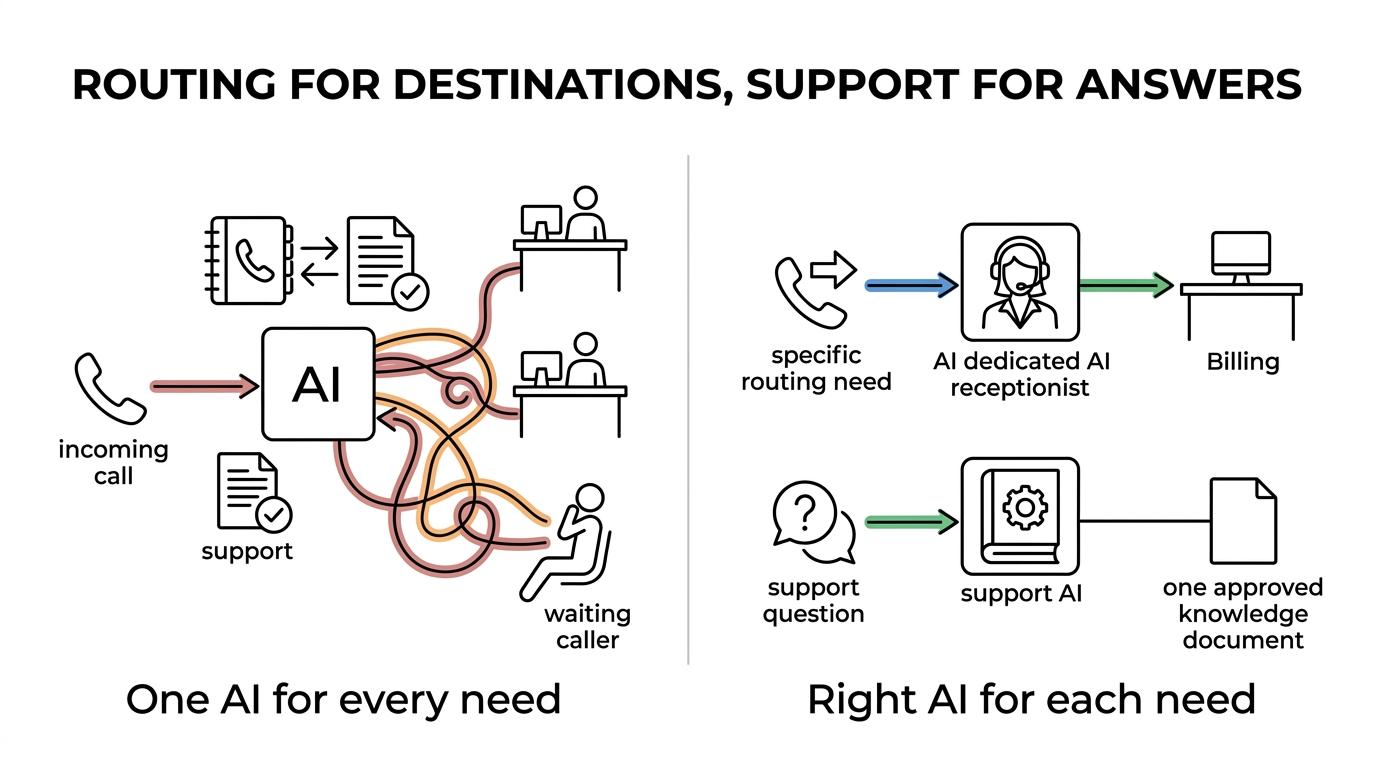
A common misconception is that the support agent should front every incoming call. In many offices, that slows the path to a person. Front desks work best when routing happens first and knowledge-based support happens where it actually fits.
How should a team map routing goals before turning on 3CX AI?
A front desk should map goals before writing prompts. The first draft should list caller intents, destination groups, business hours, and transfer exceptions because AI routing is only as good as the categories it can recognize.
Step 1: List the top reasons people call. Most teams find that a small set drives the majority of traffic: hours, location, sales, support, billing, appointment changes, and named-person requests.
Step 2: Turn those reasons into specific destinations. A destination can be a ring group, queue, user extension, voicemail box, or message workflow. If two departments handle the same topic, the team should decide the primary owner before launch.
Step 3: Define exception rules. If the office is closed, if the requested user is unavailable, or if the caller sounds unsure, the system needs a fallback path. This is where after-hours logic and operator transfer rules matter.
A useful pro tip is to start with five to ten intents, not thirty. Small categories are easier to test, easier to tune, and easier for staff to trust.
How do administrator-defined routing rules reduce front-desk mistakes?
Administrator-defined routing rules reduce errors by turning vague caller intent into a small set of actions: answer, transfer, queue, message, or escalate. That keeps AI focused on repeatable decisions instead of open-ended conversation.
This matters because front-desk work is full of patterns. If the caller asks for location details, the system can provide them. If the caller asks for billing during business hours, it can route to billing. If the office is closed, it can offer voicemail or an urgent path. If the request falls outside the allowed pattern, it can send the call to a human.
That if-then structure is often the difference between “smart” AI and useful AI. Teams do not need endless flexibility. They need reliable action on the calls they receive every day.
Another common mistake is overloading one route with too many meanings. “Support” might mean technical help, returns, service scheduling, or account access. Clear subcategories cut transfer errors fast.
How can transcription and summaries help after the call?
3CX AI Transcription helps after the call by turning voicemails and recordings into text and summaries. Stereo mode adds speaker diarization and timings, which means reception staff can see who said what instead of replaying full recordings.
This is where front-desk AI extends beyond live answering. 3CX documentation says transcription snippets for voicemails and recordings appear in the Windows Softphone, iOS app, and Android app. That gives receptionists, dispatchers, and managers a faster way to review callbacks, missed calls, and handoff quality.
“We are VoIP works with 3CX licenses, hosting, and one-time system reviews, which fits teams that want AI transcription and routing improvements without rebuilding the whole phone system.”
Step 1: Enable transcription for the call types that matter most, usually voicemails and selected recordings.
Step 2: Review the text and summary before calling back so the agent starts with context.
Step 3: Use recurring themes in the transcripts to tighten prompts, update routing rules, or improve staff scripts.
A useful misconception to clear up is that transcription is only for compliance or archives. In practice, it is often a speed tool. The shorter the replay time, the faster the callback and the cleaner the handoff.
Is 3CX AI better than a traditional IVR for reception teams?
For most busy offices, 3CX AI is better than a traditional IVR when callers speak naturally and ask the same few things every day. IVR still wins when scripted flows, keypad certainty, or strict process control matter more than conversational speed.
AI removes some of the friction that callers feel with “press 1, press 2” trees. A person can simply say, “I need service,” or “What time do you open?” That feels faster and often is faster.
IVR still has strengths. It is predictable, easy to audit, and less sensitive to phrasing. If the environment is noisy, if callers often use speakerphone in a car, or if a workflow must be exact every time, a simple IVR branch can still be the better choice.
The strongest setups often use both. AI can handle the main front door, while IVR remains available as a fallback for low-confidence recognition or high-precision options.
How should human handoff and guardrails be set?
Human handoff rules should be explicit, early, and easy to trigger. If the caller sounds upset, repeats the request, or asks for something outside policy, the system should transfer rather than keep probing.
Step 1: Define the triggers for transfer. These can include low-confidence intent, repeated requests, policy exceptions, or a direct request for a person.
Step 2: Define where the call goes. A transfer target should exist for business hours, after hours, and overflow periods.
Step 3: Define what context follows the call. The next person should receive the caller’s stated reason, any captured details, and a transcript or summary when available.
After those basics are set, most teams benefit from a short rule sheet like this:
- Low confidence: transfer to receptionist or the default queue.
- After-hours urgent: route to the on-call path or urgent voicemail.
- Repeat request: stop asking follow-up questions and transfer.
- Outside approved knowledge: hand off to a human instead of guessing.
A pro tip here is to make “operator” and “representative” universal escape words. The easier the escape hatch, the more comfortable callers feel trying the AI in the first place.
What mistakes cause front-desk AI projects to fail?
Most failed front-desk AI projects follow the same pattern: vague intents, weak fallback rules, and no review process. The issue is usually configuration discipline, not the 3CX feature set itself.
One common problem is trying to automate everything on day one. A front desk does not need twenty intents at launch. It needs the highest-volume intents handled accurately. Another issue is poor source control for support answers. If the AI Customer Service Agent is supposed to use approved knowledge sources, those sources need to be current, limited, and written clearly.
Version and edition checks matter too. 3CX states that the AI Customer Service Agent was released for AI Edition and V20 Update 10 and above, so teams on older deployments need to verify fit before planning a support workflow around it.
The final weak point is review. If no one checks transfers, transcripts, summaries, and missed intents, the system never gets better. Front-desk AI works best as a living workflow, not a one-time switch flipped on and forgotten.
Ready to Optimize Your 3CX System?
Get expert guidance with our $49 system checkup.