Schedule a 3CX System Checkup: $49 Expert Audit Offer
A 3CX phone system can appear stable on the surface while small problems build up underneath. A few missed updates, a failed backup job, a router with SIP ALG still active, or a weak remote phone setup can slowly chip away at call quality and reliability.
That is why a focused 3CX system checkup deserves a place on the IT calendar, not just the emergency list.
For small and mid-size businesses, a low-cost audit can be a smart way to catch risks early, especially when internal teams are busy or 3CX is only one part of a larger workload. Publicly available details for every checkup package are not always extensive, so the best way to think about a $49 3CX audit is as an affordable expert review designed to spot issues, confirm system health, and point the business toward the right next step.
What a 3CX system checkup should review
A proper 3CX system checkup is not just a quick glance at whether phones are ringing. It should look at the parts of the platform that most often cause real business trouble: network settings, event logs, update status, backups, security posture, and the way desk phones or remote devices are connected.
3CX guidance consistently places firewall behavior, NAT handling, supported phone topology, and event monitoring near the top of the priority list. That makes sense. Many of the most frustrating voice problems do not come from the PBX itself. They come from the environment around it.
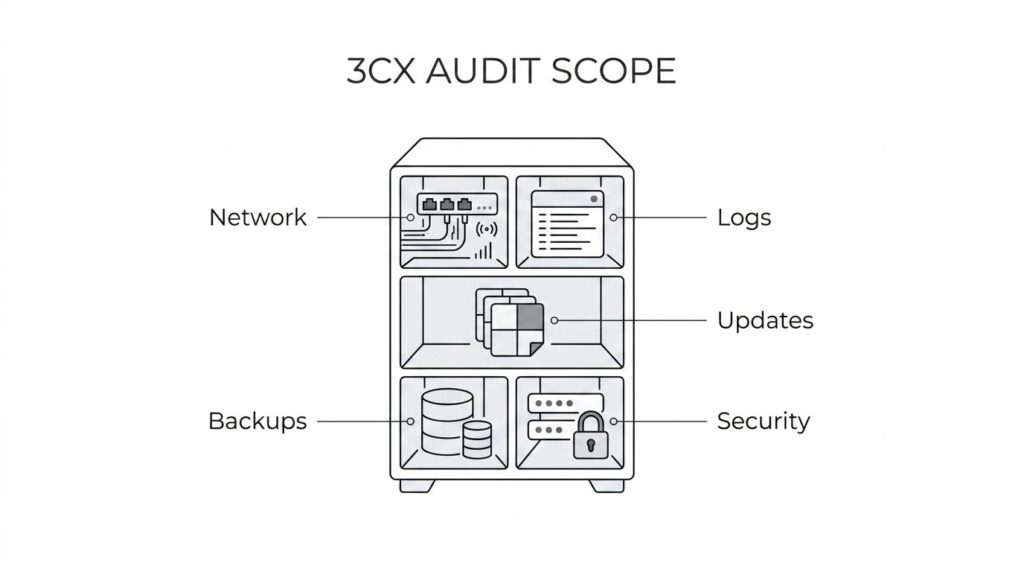
After an initial review, a strong checkup usually aims to answer one basic question: is the system healthy, supported, and ready for daily use without hidden risk?
Typical review areas include:
- Firewall and NAT behavior
- SIP ALG status
- Event and audit log review
- Version and hotfix level
- Backup status and restore readiness
- Supported phones and remote device setup
- Credential hygiene
- Trunk and registration stability
Why a 3CX audit matters for business continuity
Phone issues rarely stay small for long. A one-way audio problem can become missed sales calls. A backup failure can become hours of downtime after a server problem. An unsupported phone topology can turn routine support into a slow, recurring cycle.
That is why periodic audits are valuable even when users are not actively complaining.
A business with more than five employees often has enough call traffic, enough extensions, and enough moving parts that “mostly working” is no longer good enough. Remote users, mobile apps, desk phones, SIP trunks, call queues, and reporting all depend on clean configuration.
The table below shows why a checkup has practical value beyond troubleshooting.
| 3CX review area | Common symptom | Business effect | |—|—|—| | Firewall and NAT settings | one-way audio, dropped calls, failed registrations | missed conversations and unreliable calling | | Event log and alerts | issues go unnoticed until users complain | slower response and longer outages | | Updates and hotfixes | lingering bugs or security exposure | avoidable risk and support friction | | Backup status | restores are untested or failing | weak recovery readiness | | Phone topology | remote phones behave inconsistently | repeated tickets and unstable user experience | | Security settings | weak credentials or stale provisioning data | higher risk of unauthorized access |
Key network checks in a 3CX system checkup
Network health has a direct effect on 3CX performance. When a system is installed correctly but the firewall or router is not configured for 3CX requirements, call quality tends to suffer first. One-way audio, intermittent app registration, and dropped calls often point back to the edge of the network.
This is where expert review saves time. Instead of treating each user complaint as an isolated problem, a checkup looks for root causes. A router with SIP ALG enabled, improper port forwarding, or NAT behavior that does not match 3CX expectations can affect many users at once.
Remote phones deserve special attention. In many cases, 3CX strongly favors supported deployment methods like an SBC or router phone setup rather than older or unsupported patterns that create instability.
A useful network review often includes:
- Firewall validation: confirm that the system passes expected checks and that required ports behave correctly
- SIP ALG review: identify whether the router is interfering with SIP traffic
- NAT behavior: verify that external traffic is handled in a way 3CX supports
- Remote device topology: confirm whether desk phones and remote locations are using a supported design
- Trunk path testing: look for registration failures, call setup errors, or audio path problems
Key security checks in a 3CX system checkup
Security should never be treated as a separate project from voice reliability. In 3CX, the two are closely connected. Weak credentials, ignored audit logs, and old provisioning artifacts can create risk even when call quality seems fine.
A good checkup reviews whether admin access is properly controlled, whether the system is up to date, and whether there are signs of stale or risky configuration choices. That can include password hygiene, provisioning practices, and the status of any recent updates or security fixes.
It also helps answer a question many businesses quietly carry: if a device were replaced today or if a problem forced a restore tomorrow, would the team know exactly what to do?
Security review is especially helpful for companies that have changed staff, added remote users, or inherited a 3CX system from a former IT provider.
What a $49 3CX system checkup can realistically provide
A $49 offer stands out because it lowers the barrier to getting expert eyes on the system. For many businesses, that is enough reason to act. Waiting until a major outage happens is almost always more expensive.
Still, a smart buyer should keep expectations realistic. At that price point, a checkup is best viewed as an expert audit or health review, not a full remediation project with hours of implementation work included. Its value comes from quickly identifying weak points, surfacing misconfigurations, and helping the business decide what should be fixed first.
That kind of audit can be extremely useful. It can tell a company whether the current setup is solid, whether cloud hosting would make more sense than maintaining on-prem hardware, whether the current 3CX license still fits operational needs, or whether the system is carrying avoidable risk.
What that means in practice:
- Fast baseline: a snapshot of the system’s current health
- Priority setting: which issues need immediate action and which can wait
- Support planning: whether internal IT can handle the next steps or outside help makes more sense
- Buying clarity: whether to keep the current setup, move to hosted 3CX, or refresh licensing
Signs a business should schedule a 3CX system checkup soon
Many companies wait too long because the system is still “working.” That can be misleading. A healthy-looking dashboard does not always show weak backup practices, unsupported remote phones, or security gaps.
A checkup is worth scheduling when any of these warning signs appear:
- One-way audio
- Dropped calls
- Random phone re-registration
- Failed or unverified backups
- Aging on-prem server hardware
- Unclear admin access history
- Recent office move or firewall change
- Remote users with recurring phone issues
- Old 3CX version or delayed hotfixes
- Plans to add AI features or deeper reporting
Even one of those issues can justify a review.
A business that has not had its 3CX setup reviewed in a long time is often carrying at least one hidden risk.
How a 3CX checkup supports licensing, hosting, and cloud migration
A system review does more than spot technical flaws. It also helps businesses make cleaner platform decisions. That matters when the team is debating whether to keep an on-prem setup, move to the cloud, change hosting providers, or buy a new 3CX license.
For companies running 3CX in-house, a checkup can show whether the environment is still worth maintaining. If the server is aging, backups are weak, or remote access is harder than it should be, hosted 3CX may offer a simpler path. If the current licensing level no longer matches real call demand, the audit can surface that before performance or budget suffers.
This is also where provider support matters. A company that offers 3CX licenses, hosting services, and a one-time system checkup can give businesses a practical route from “something seems off” to “here is the best path forward.”
That path may look different depending on the current environment:
- On-prem to cloud: review trunks, phone provisioning, firewall exposure, and backup plans before moving
- License refresh: confirm whether the current license still fits concurrent call needs and expected growth
- Hosting decision: check whether internal staff wants to manage updates, logs, and recovery tasks long term
- Feature expansion: verify version readiness before rolling out AI functions, reporting tools, or workflow changes
What to ask before booking a 3CX system checkup
A little clarity upfront makes the audit more useful. Businesses should ask whether the service includes written findings, whether firewall and event log review are part of the process, and whether the provider checks backup health, version status, and phone topology. Those questions help set the right expectations.
It is also smart to ask whether the checkup is audit-only or whether any fixes are included. Some businesses just need a clean report and next-step guidance. Others want the same provider to handle remediation, hosting, or a migration to a better-supported environment.
A provider that works with 3CX licenses, hosting, and system reviews can often support all three stages: assess, fix, and maintain. That creates a much smoother handoff when the audit uncovers something that needs attention right away.
For businesses that want a fast, low-risk starting point, a small investment in a 3CX system checkup can turn uncertainty into a clear action plan.
Ready to Optimize Your 3CX System?
Get expert guidance with our $49 system checkup.