3CX AI Call Summaries and Transcriptions: Setup and Use Cases

Teams using 3CX are paying close attention to AI call summaries and transcription for a simple reason: they turn phone conversations into usable business records. Instead of relying on handwritten notes, memory, or long call review sessions, staff can work from a transcript, a short summary, and clear follow-up points. That saves time, reduces missed details, and gives managers a faster way to review customer interactions.
For small and mid-size businesses, this matters even more. A busy sales or support team can lose important details in the middle of back-to-back calls. With 3CX AI transcription enabled, calls and voicemails become searchable records that support better service, faster handoffs, and more consistent reporting.
What 3CX AI call summaries and transcriptions do
3CX AI transcription converts recorded calls and voicemails into text. AI summaries then condense those conversations into a shorter overview that highlights key points, likely action items, and the main topic of the call. The result is practical, not just impressive. Staff spend less time replaying calls and more time acting on them.
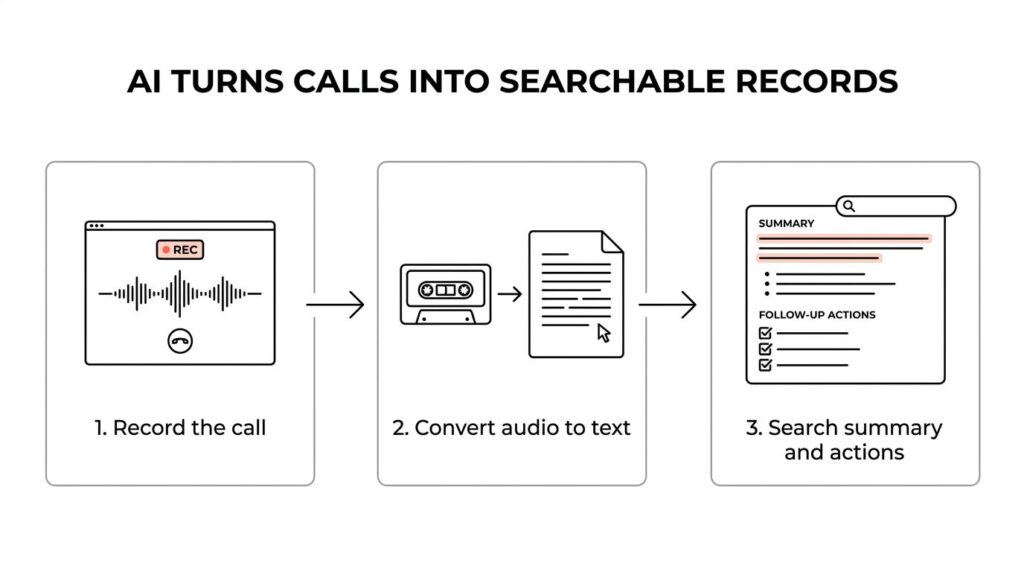
This feature is especially useful in departments where conversations carry business value long after the call ends. Sales teams can check objections and next steps. Support teams can verify what was promised. Managers can review trends without listening to every recording. Organizations that need documented call records for internal controls or compliance also get a stronger audit trail.
A few common outcomes stand out:
- Searchable call history
- Faster call review
- Better follow-up accuracy
- Less manual note-taking
3CX license and version requirements for AI transcription
Before setup begins, the system needs the right 3CX edition and a current version. Voicemail transcription requires at least a 3CX Professional license. Full voice call transcription requires the proper Enterprise or AI-capable licensing, and current 3CX guidance ties voice call transcription to Enterprise or AI licensing with at least 16 simultaneous calls.
The system should also be on 3CX V20 Update 8 or later for the broadest support of these features. If a business has older on-prem infrastructure or a long-standing deployment that has not been updated recently, this is often the first checkpoint. AI features tend to expose gaps in older licensing, outdated builds, or incomplete recording settings.
That makes a license and version review a smart starting point before any wider rollout. It is far easier to confirm platform readiness first than to troubleshoot a transcription issue that is really a licensing issue.
How to enable 3CX AI transcription in the Admin Console
The setup path in 3CX is direct once prerequisites are in place. Administrators enable the AI service, choose the transcription language, and save the settings. After that, transcription can be enabled at the department, user, queue, or ring group level depending on how broad the rollout should be.
That flexibility is one of the strongest parts of the feature. A business does not need to transcribe every call in the company. It can enable transcription only where it creates real value, which helps with privacy, storage, and processing demand.
A typical setup flow looks like this:
- Admin Console → Integrations → Transcription: Select 3CX AI, choose the language, and click Save
- Departments: Turn transcription on for recorded calls or voicemails within a department
- Users: Enable transcription for specific extensions when only a few users need it
- Queues and ring groups: Apply transcription in call handling settings for customer-facing teams
- Reports and email delivery: Review transcripts and summaries in Reports, or send them by email when notification settings allow it
Calls must be recorded to be transcribed. If call recording is disabled, there is nothing for the AI service to process. That is an easy detail to miss during setup, especially in environments where recording rules vary by department.
3CX AI transcription hardware requirements and deployment choices
Businesses can run transcription through 3CX cloud options or with a local transcription engine server. The right model depends on call volume, privacy needs, and how much infrastructure the business wants to manage.
For on-prem deployments, 3CX recommends a dedicated transcription engine server with strong resources. GPU support becomes very important at higher volumes. Smaller teams may prefer a cloud-based transcription bundle to avoid buying and maintaining GPU hardware.
| Component | Minimum Requirement | Recommended | |—|—:|—:| | CPU | 4 vCPU | 6 vCPU | | RAM | 24 GB | 24 GB or more | | GPU | Optional if using external/cloud service | NVIDIA RTX class GPU with about 24 GB VRAM | | Disk | 20 GB free | 20 GB or more | | OS | Debian 12 | Debian 12, fully updated |
A practical planning model often looks like this:
- Small teams with moderate call volume: cloud transcription is usually the simplest path
- Mid-size businesses with regular queue traffic: a dedicated transcription server often makes sense
- High-volume environments: stronger GPU resources or cloud scaling should be planned from the start
This is also where hosting decisions matter. A business moving from on-prem 3CX to the cloud may find that AI features are easier to support once the PBX, storage, and transcription plan are reviewed together.
Best practices for 3CX AI transcription accuracy
Transcription quality depends heavily on audio quality. Even strong AI performs poorly when audio is weak, noisy, clipped, or mixed badly. A business that wants dependable summaries should treat call audio as part of the project, not as a separate issue.
Stereo recording is especially helpful because it separates speakers into different channels. That gives 3CX a better chance to label who said what. Good microphones, stable networking, and proper QoS also matter. Packet loss and jitter can hurt transcription just as much as a bad headset.
A few best practices consistently improve results:
- Use stereo recording: Better speaker separation improves transcript clarity
- Match the language setting: Pick the right language or dialect for the calls being recorded
- Keep audio clean: Reduce background noise, echo, and volume swings
- Limit transcription where needed: Focus on sales, support, or compliance-heavy teams first
- Update supporting systems: Keep Debian packages, GPU drivers, and 3CX components current
It also helps to test with real calls before a full rollout. Internal test calls are useful, but customer calls reveal whether accents, devices, mobile audio, and queue routing create any accuracy issues.
3CX permissions and transcript access rules
Not every role in 3CX has the same level of access to transcripts and recordings. This matters for security and for day-to-day usability. A business may enable transcription successfully, only to find that the people expected to review it do not have access.
System Owners have full visibility into management-related content, including recordings, transcriptions, chats, and call logs. System Administrators can configure many settings but do not automatically have the same access to recordings or transcripts. Department Managers can access call recordings for their department, which makes them important reviewers for sales and support operations.
That role structure should be checked before rollout. Teams should decide who can configure transcription, who can view transcripts, and who should receive emailed summaries. Clear permissions reduce confusion and keep sensitive call content limited to the right staff.
Practical use cases for 3CX AI call summaries
The strongest use cases are the ones tied directly to workflow. If transcripts simply sit in storage, the business gets only part of the value. When summaries support follow-up, coaching, compliance, and reporting, the feature becomes much more useful.
Sales teams benefit quickly. A rep can review what the prospect asked, what pricing was mentioned, and what next step was agreed on without replaying the entire conversation. Managers can check call quality and consistency in less time.
Support teams gain a different advantage. Instead of listening through long calls to identify the issue, the manager or escalations team can read the summary first. That makes issue handoff faster and helps build internal knowledge from real customer interactions.
Some of the best use cases include:
- Sales follow-up: confirm objections, pricing points, and promised next steps
- Customer support: capture issue summaries and resolution details
- Compliance review: keep documented records of client instructions or disclosures
- Internal meetings: record project discussions and action items automatically
- Voicemail triage: read missed-call messages quickly without playing each one
How 3CX AI transcription improves daily operations
The biggest gain is not just time saved after the call. It is improved focus during the call. Staff no longer need to split attention between listening and taking detailed notes. That often leads to better conversations because the caller gets fuller attention.
Managers also save time. Reading a summary is faster than listening to a ten-minute recording. Searching transcripts by keyword is faster than trying to remember when a certain topic came up. Over time, that creates a growing repository of customer language, repeated issues, product questions, and coaching examples.
This operational impact often shows up in a few areas:
- faster onboarding for new agents
- more consistent follow-up
- easier dispute review
- better visibility into call trends
CRM, helpdesk, and reporting workflows with 3CX AI transcription
3CX already supports integrations that log calls into business systems, and that opens the door for transcripts and summaries to support broader workflows. Even when the default connector logs call activity rather than full transcript text, connected systems can still benefit from the structured information produced by 3CX.
A CRM record with a call log is useful. A CRM record with a call log and a concise summary is much more useful. That gives sales and account teams context right inside the customer record. Helpdesk platforms can benefit in the same way by attaching call context to a ticket.
This can support workflows like these:
- CRM logging: Match calls to contacts and attach notes for faster account review
- Helpdesk ticket context: Add issue summaries so agents start with the key facts
- Reporting and analytics: Combine transcript data with call metrics for trend analysis
For businesses already using HubSpot, Salesforce, Zoho, Zendesk, Freshdesk, or similar platforms, this is where the feature starts to move from convenience to real process improvement.
Common 3CX AI transcription limits and planning tips
AI transcription is powerful, but it still needs planning. Poor audio lowers accuracy. Wrong language selection can distort results. Limited hardware can slow processing. Recording and privacy rules must still be followed, even when the AI feature is technically ready.
Fair-use limits and transcription minute allowances also need attention. A business with heavy queue traffic should estimate volume before turning transcription on everywhere. This is one reason a phased rollout works well. Start with one or two departments, measure usage, then expand with better data.
For teams unsure where to begin, a focused 3CX review can help identify the right license, hosting path, recording design, and AI rollout plan. That is especially useful for businesses moving from on-prem 3CX to the cloud, or for teams that want AI features without taking on all the maintenance work internally.
When setup, access, recording policy, and infrastructure are handled correctly, 3CX AI transcription becomes more than a feature checkbox. It becomes a reliable part of how a business captures conversations, supports staff, and responds faster after every important call.
Ready to Optimize Your 3CX System?
Get expert guidance with our $49 system checkup.