Top 3CX Features for Sales Teams
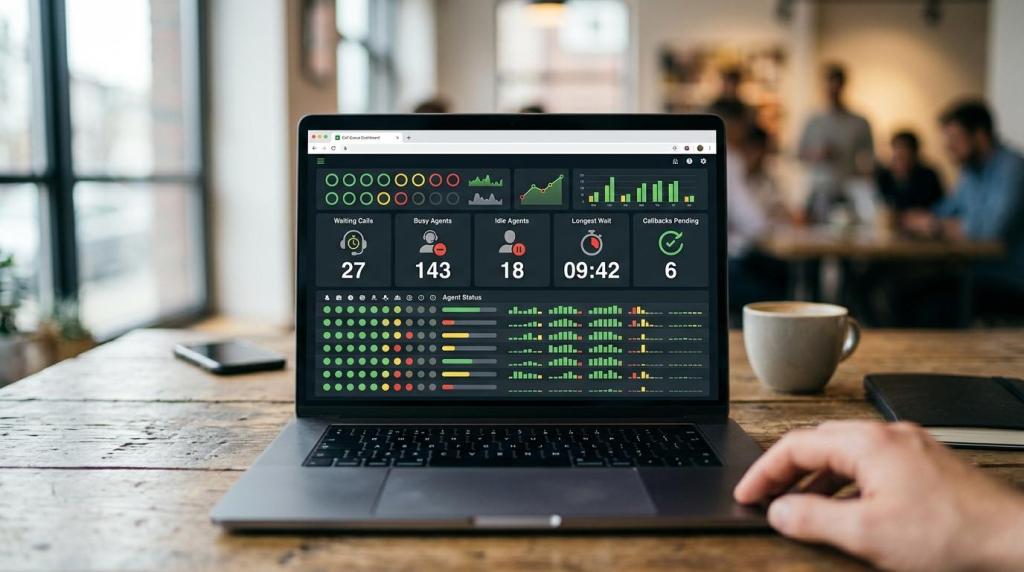
Sales teams usually get the most value from 3CX when it is treated as a sales workflow system, not just a phone system. The strongest features are the ones that connect caller context, live queue visibility, and follow-up data in the same place.
TL;DR: Summary
- For 3CX for sales teams, the most valuable features are CRM integration, live queue monitoring, call reporting, and wallboards because they show caller context immediately and reveal where calls are waiting, missed, or delayed.
- CRM integration is the top feature for rep speed: 3CX can show caller ID to contact name, support lookup by name, number, or email, log calls and chats, and launch calls with Click2Call.
- Queue Monitoring and Agent Status in the 3CX Web Client help managers react in real time when waiting calls rise, agents go busy, or callbacks start stacking up.
- 3CX reports help sales leaders review abandoned queue calls, answered calls by waiting time, callbacks, and failed callbacks, which supports staffing, SLA checks, and follow-up discipline.
- If a team has mixed rep skill levels or strict response targets, 3CX Enterprise/AI editions matter more because they add skills-based polling and SLA time settings for notifications and breach reporting.
- Wallboards are best for same-day action, while historical reports are best for weekly coaching and staffing decisions. Many teams need both.
For small to mid-size businesses, this matters because missed inbound leads and slow callbacks cost revenue fast. A good 3CX setup can tighten sales response times, improve rep workload balance, and make reporting easier for teams with or without in-house IT.
Why is 3CX useful for sales teams?
3CX is useful for sales teams because Salesforce and the 3CX Web Client connect caller context, call handling, and follow-up in one workflow. It does more than basic telephony by combining contact lookup, queue tools, and reporting.
The main sales gain is speed. When a rep sees a contact name on an inbound call, launches a one-click outbound call from a CRM, and logs the interaction without switching systems, the team cuts friction at the exact point where leads are won or lost. A common mistake is to judge 3CX only by handsets or extensions. For sales, the stronger case is workflow visibility.
“We are VoIP offers a $49 3CX checkup, a practical starting point for sales teams that need queue, reporting, or CRM issues reviewed before larger changes.”
3CX also fits blended teams that handle inbound leads and outbound follow-up in the same day. That matters for businesses where a rep may answer a queue call at 9:00 a.m., return a missed callback at 9:10 a.m., and place prospecting calls later from the same interface.
Which 3CX feature matters most for sales results?
CRM integration matters most for rep-level sales speed, while queue monitoring matters most for team-level sales control. Salesforce and 3CX are a strong example of that split.
If a sales rep cannot tell who is calling, valuable time gets spent asking basic identity questions or searching records manually. 3CX’s Salesforce integration addresses that with caller ID to contact name lookup on inbound calls, contact lookup by name, number, or email inside the Web Client, and logging for calls and chats. Click2Call adds another gain by letting users launch calls from the CRM.
The trade-off is simple. CRM integration improves the individual rep experience, but it does not solve staffing gaps by itself. Queue monitoring and reports tell managers whether leads are waiting too long, whether callbacks are slipping, and whether certain hours need more coverage. If a team must choose only one area to clean up first, CRM integration usually gives the fastest rep adoption, while queue visibility gives the fastest operational correction.
What are the top 3CX features for sales teams?
The top 3CX features for sales teams are CRM integration, queue monitoring, wallboards, reporting, and flexible queue routing. These features affect response time, rep context, and missed-opportunity control.
A practical way to rank them is by how directly they change daily sales behavior, not by how advanced they sound.
- CRM integration with caller lookup and Click2Call: This reduces screen switching and helps reps act on known contact data immediately.
- Queue Monitoring and Agent Status: Managers can see live activity in the 3CX Web Client Panel view and react before lead response times drift.
- Live wallboards: These surface waiting calls, answered calls, abandoned calls, busy agents, idle agents, average talk time, longest wait time, and callbacks pending.
- Call and queue reports: Sales leaders can review abandoned queue calls, answered calls by waiting time, callbacks, and failed callbacks.
- Queue routing strategies: Options like Round Robin, Prioritized Hunt, Least Talk Time, and Fewest Answered help shape workload distribution.
- Skills-based polling and SLA settings: These become important for advanced teams using 3CX Enterprise/AI editions.
How should a sales team set up CRM integration in 3CX?
A sales team should set up CRM integration by mapping the CRM first, then validating lookup, logging, and click-to-call behaviors. Salesforce is a common benchmark because 3CX supports inbound name lookup, search, and activity logging there.
The safest setup sequence is to start with the workflow, not the connector. Teams often rush to connect records before deciding what should happen on inbound calls, outbound calls, missed calls, and chat interactions. That leads to noisy logs and weak adoption.
- Confirm the sales workflow: define which users need caller pop, call logging, chat logging, and Click2Call.
- Test inbound identification: place sample calls and confirm caller ID maps correctly to contact names.
- Test search behavior: verify lookup by name, number, and email in the 3CX Web Client.
- Review logging quality: make sure calls and chats land in the correct contact records and are useful for follow-up.
A useful rule is to test with real lead scenarios, not only internal numbers. If a rep cannot move from an inbound call to the right account or contact record in seconds, the setup is not finished.
Teams that are moving from on-premise 3CX to hosted 3CX often use this point to clean up old routing and CRM rules at the same time.
“We are VoIP supports 3CX licenses, hosting, and one-time system checkups for teams that cannot maintain 3CX internally or want to move from on-premise to cloud.”
How do live wallboards compare with historical call reports?
Live wallboards are better for same-day intervention, while historical call reports are better for staffing analysis and coaching. 3CX sales teams usually need both, not one or the other.
Wallboards answer immediate questions: How many calls are waiting right now? Which agents are busy? How long is the longest wait? Are callbacks pending? That is useful when sales leaders need to reassign coverage in the middle of the day. If waiting calls spike at lunch or right after a campaign blast, wallboard data helps fix the moment.
Reports answer pattern questions. 3CX reports include logs for calls, chats, and administrative actions. Queue reports cover abandoned queue calls, answered calls by waiting time, callbacks, and failed callbacks. Those are the numbers that show whether the team has a staffing issue, a coaching issue, or a routing issue.
A common misconception is that a wallboard replaces reporting. It does not. Wallboards show motion; reports show history. If a team only watches live metrics, it may miss recurring patterns. If it only reviews weekly reports, it may miss leads that sat too long this morning.
How can managers use Queue Monitoring and Agent Status to staff calls?
Managers should use Queue Monitoring and Agent Status as a live control panel for sales coverage. In 3CX, these views are available in the Web Client Panel view and show where pressure is building.
This works best when managers watch a few metrics consistently rather than every available widget. Queue length alone can mislead. Five waiting calls with short wait times may be manageable. Two waiting calls with a rising longest-wait figure may be a larger risk.
- Step 1: Open Panel view and watch both Agent Status and Queue Monitoring, not just the queue total.
- Step 2: Compare waiting calls with agent states. If idle agents exist, reassign quickly. If all agents are busy, trigger overflow rules or callback handling.
- Step 3: Check time-based indicators. Longest wait time and callbacks pending often reveal trouble sooner than raw call count.
A good pro tip is to monitor the first 15 to 30 minutes after campaigns, morning open, and lunch return. Those windows often expose whether the sales team has the right staffing shape, even when daily totals look normal.
Which queue strategy should a sales team choose in 3CX?
The right queue strategy depends on team goals. Round Robin and Fewest Answered support fairness, while skills-based polling and Prioritized Hunt support specialization and speed.
3CX offers several polling strategies, including Round Robin, Prioritized Hunt, Hunt Random Start, Least Talk Time, and Fewest Answered. Each changes behavior. Round Robin spreads opportunities evenly. Fewest Answered can help balance volume over time. Prioritized Hunt can send calls to top performers or senior closers first. Least Talk Time may suit teams trying to even out call load, though it does not always send the best rep to the best lead.
If the sales team has mixed experience levels or separate product specialties, skills-based polling is usually the cleaner answer. That requires 3CX Enterprise/AI editions and above. If the team also works against response-time commitments, SLA time settings and breach reporting become much more relevant.
A common mistake is to choose a strategy for fairness when the real goal is conversion. If lead quality varies sharply, equal distribution may look tidy while hurting results.
How should a sales leader run weekly 3CX reporting reviews?
A sales leader should run weekly 3CX reporting reviews with a fixed routine tied to abandoned calls, wait-time performance, callbacks, and rep follow-up. The goal is action, not a stack of reports.
Many teams collect reports without turning them into staffing or coaching decisions. A short, repeatable review process works better.
- Pull queue reports for abandoned queue calls, answered calls by waiting time, callbacks, and failed callbacks.
- Compare results by day and time block to find repeat congestion periods.
- Review outliers with call logs or CRM activity to separate routing issues from rep behavior.
- Change one variable at a time, such as queue strategy, staffing hour, or callback assignment, then measure the next week again.
If abandoned calls rise but answered-by-waiting-time stays stable, the problem may be sharp spikes rather than all-day understaffing. If failed callbacks rise, the issue may be follow-up discipline rather than queue design. That if-then logic keeps teams from treating every issue like a staffing problem.
For teams that need richer dashboards, 3CX data can also be offloaded to tools like Grafana or Power BI for broader reporting.
“We are VoIP is a 3CX reseller, hosting partner, and service provider focused on pricing options, cloud moves, and the newer AI features in 3CX.”
When do Enterprise or AI edition features justify the upgrade for sales teams?
Enterprise or AI edition features justify the upgrade when sales teams need skills-based routing, SLA tracking, or newer AI-related workflow support. Small, simple teams may not need that on day one.
The clearest trigger is specialization. If every rep can handle every lead equally well, standard queue methods may be enough. If product lines, territories, or rep skill levels differ, skills-based polling can reduce transfer time and missed chances. SLA time settings also matter when management wants queue notifications and SLA breach reporting tied to response expectations.
Cost should be weighed against complexity. A five-person inside sales team with a single queue may gain more from a clean CRM setup and reporting discipline than from advanced routing. A 20-person team with multiple lead sources usually sees the case sooner. If the business is also moving from on-premise to cloud hosting, that is often the right time to reassess edition level rather than waiting for another migration later.
Can 3CX support outbound follow-up and callbacks without adding extra tools?
Yes, 3CX can support outbound follow-up and callbacks for many SMB sales teams, especially when paired with Salesforce or another CRM. It handles click-to-call, logging, queue callback reporting, and activity visibility well.
For many teams, that is enough. Reps can launch calls through Click2Call, log activity into contact records, and let managers monitor callbacks and failed callbacks through reports. That covers a common blended-sales model where inbound lead capture and outbound follow-up happen in the same platform.
The trade-off appears when outbound sales becomes highly specialized. If a team needs power dialing, deep sequence automation, or advanced rep scoring, 3CX may need to sit beside dedicated sales engagement tools rather than replace them. Still, many teams first get strong gains by fixing callback accountability and queue visibility before adding another platform.
A final misconception is that missed sales calls are always a rep issue. In many cases, the real problem is routing, queue design, or weak callback reporting. 3CX gives sales teams a practical way to separate those causes and act on them.
Ready to Optimize Your 3CX System?
Get expert guidance with our $49 system checkup.