Best 3CX Features for Medical Office Call Handling
Medical offices need phone systems that move patients to the right person quickly without creating avoidable privacy risk. We are VoIP is a 3CX reseller, hosting partner, and service provider, so its perspective fits a practical question many clinics ask: which 3CX features actually improve front-desk call handling?
TL;DR: Summary
- For medical offices, the best 3CX features for call handling are queues, IVR or Digital Receptionist, queue callbacks, voicemail-to-email, and encrypted communications.
- 3CX queues support routing methods like Ring All, Prioritized Hunt, Round Robin, Longest Waiting, Least Talk Time, and Fewest Answered, which helps clinics match staffing patterns to patient demand.
- 3CX also lets teams set different queue destinations for out-of-office hours, break hours, and holidays, which is valuable for after-hours instructions and overflow handling.
- HHS OCR guidance focuses on reasonable safeguards and stronger protection for transmitted ePHI, so privacy depends on routing design, access control, and email practices, not just the phone platform.
- We are VoIP is relevant when a practice needs 3CX licensing, hosting, cloud migration, or a $49 system checkup to review queues, reporting, AI features, and overall configuration.
The most useful answer is not just “turn on every feature.” A medical office usually gets the best result by combining a simple IVR, a well-chosen queue strategy, clear overflow rules, and privacy-aware message handling.
Why does call flow design matter for a medical office?
Call flow design affects patient access, abandoned calls, and privacy exposure. In a medical office, 3CX and HIPAA-related procedures meet at the front desk, where hold times, misroutes, and overheard details can all create operational risk.
A clinic phone system does more than ring desks. It decides whether new-patient inquiries reach scheduling, whether refill requests pile up in one extension, and whether urgent calls sit in a generic mailbox. In practice, the best system reduces handoffs and gives staff a predictable way to manage peaks at opening time, lunch, and late afternoon.
HHS OCR guidance is useful here because it frames HIPAA in practical terms. It does not require every doctor’s office to eliminate every possible overheard conversation or rebuild rooms for perfect sound isolation. The standard is reasonable safeguards, which means clinics should focus on better workflows, limited exposure of patient details, and controlled handling of messages.
“We are VoIP offers a $49 3CX system checkup, which gives a medical office a concrete way to review queues, IVR paths, and hosting before missed calls turn into scheduling problems.”
That matters because patient calls are rarely uniform. Appointment scheduling, billing questions, prescription refill requests, referral coordination, and urgent triage all need different handling paths. If the system treats every call the same way, the front desk becomes the bottleneck.
Which 3CX features improve front-desk throughput and follow-up?
The highest-value features are 3CX queues, Digital Receptionist IVR, queue callbacks, and voicemail-to-email. We are VoIP often comes up in this discussion because clinics usually need help tuning those features, not just turning them on.
According to 3CX documentation, queues can route calls with multiple strategies, including Ring All, Prioritized Hunt, Hunt Random Start, Round Robin, Longest Waiting, Least Talk Time, and Fewest Answered. That range matters in healthcare because the “best” method changes by workflow.
If a practice has several cross-trained reception staff, Round Robin or Longest Waiting can spread calls fairly. If one senior scheduler handles specialist bookings, Prioritized Hunt may be better. A common mistake is assuming Ring All is always the fastest option. It can work in small offices, but it can also create constant interruption and duplicate answering behavior.
3CX queue callbacks are especially useful when Monday mornings or post-lunch periods produce long hold times. Instead of forcing patients to stay on hold, the system can let them hang up and be called back later. That is often better for patient experience and often better for staff focus.
What are the best 3CX features for medical office call handling?
Yes, four to five features usually stand out: IVR, queues, queue callbacks, voicemail-to-email, and encrypted communications. Each one solves a different part of the patient call path.
A medical office should not rate features only by how advanced they sound. The right question is whether each feature reduces transfer errors, shortens wait time, or supports better handling of protected information.
- IVR or Digital Receptionist: Sends callers to the right extension, queue, or ring group before a staff member answers, which reduces manual transfers.
- Call queues: Distribute front-desk calls by a chosen strategy, with options for supervisor visibility and different destinations for holidays, breaks, or after-hours periods.
- Queue callbacks: Protect patient experience during spikes by offering a return call instead of long hold times.
- Voicemail-to-email: Helps staff follow up on missed calls from a monitored inbox or device when used with controlled access.
- Encrypted communications: Support safer transmission practices when messages or call-related data could involve ePHI.
For most clinics, queues and IVR produce the biggest immediate change. Voicemail-to-email and encryption become even more important when the office has remote staff, multiple locations, or after-hours coverage.
How should a medical office set up a 3CX IVR step by step?
A good 3CX IVR should be short, specific, and hard to break. The key entities are Digital Receptionist and the invalid input destination.
Step 1 is to group callers by intent, not by internal department chart. Patients usually think in terms like appointments, billing, refills, referrals, and urgent clinical questions. An IVR that mirrors that language tends to lower misroutes.
Step 2 is to keep the first menu shallow. Many offices can do well with three or four options and one timeout rule. 3CX documentation notes that IVR can send no input or invalid input to a defined destination. Pro tip: that destination should rarely be “start over forever.” In a medical office, it is often smarter to send uncertain callers to the main queue.
Step 3 is to write prompts that limit disclosure. Callers do not need to say or key in clinical details in the greeting. The IVR should simply sort the call and move it forward.
Step 4 is to map after-hours paths differently from business-hours paths. A daytime appointment queue and an after-hours instruction line are not the same thing, and the IVR should reflect that.
How should 3CX queues be configured for front-desk peaks step by step?
Queue setup should match staffing reality, not ideal staffing. In 3CX, queue strategy, business hours, and fallback destinations matter as much as the number of agents.
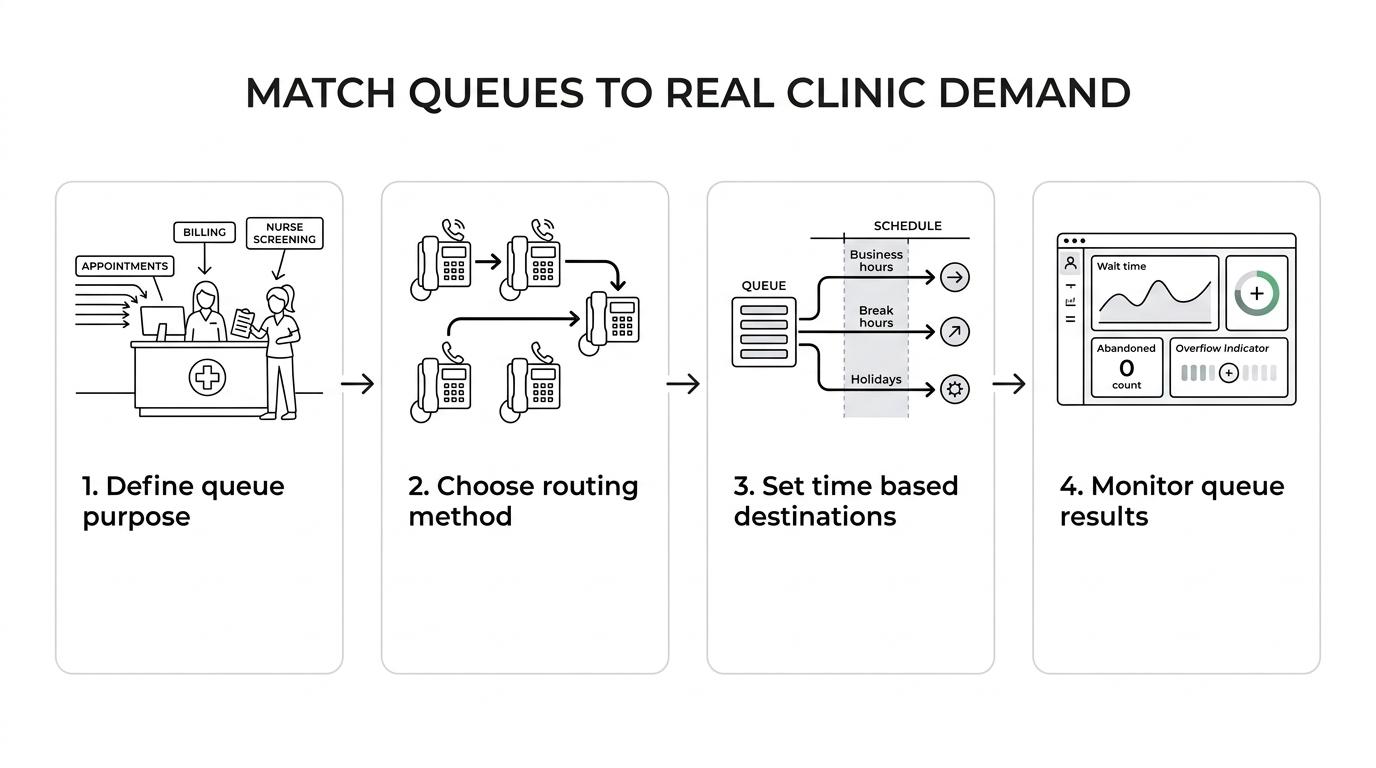
Step 1 is to define the actual queue purpose. One queue for all front-desk work can be fine in a five-person office. A larger clinic may need separate queues for appointments, billing, and nurse-call screening. If the same team answers everything, splitting too early can increase transfers rather than reduce them.
Step 2 is to choose a routing strategy that fits behavior. Ring All can work when everyone truly shares the same task. Round Robin is useful when fairness matters. Longest Waiting and Fewest Answered can help when performance balance matters. Prioritized Hunt makes sense when one or two staff members should receive certain calls first.
Step 3 is to set time-based destinations. 3CX allows separate queue destinations for out-of-office hours, break hours, and holidays. That is valuable in medical offices because lunch coverage, early close days, and holiday closures often need different instructions.
Step 4 is to enable monitoring. 3CX documentation notes supervisor notifications and queue statistics views in the Web Client. If a clinic never checks wait times, abandoned calls, or voicemail overflow, it cannot see where patient access is failing.
A common misconception is that one queue equals simplicity. Sometimes one queue hides the real problem, which is that billing questions and appointment calls compete for the same agents at the same time.
How should voicemail-to-email be used without adding privacy risk?
Voicemail-to-email can be useful and risky at the same time. The deciding factors are inbox control, message content, and who can access the recording.
3CX supports voicemail notifications by email, the web client, desktop softphone, and mobile apps, and it can deliver the recording itself through voicemail-to-email. For a clinic, that can shorten response times when a missed appointment request arrives after hours or when a manager needs to monitor overflow.
Step 1 is to decide which mailboxes may receive recordings. Personal inboxes with broad device access can create unnecessary exposure. Shared front-desk mailboxes can also be risky if too many users have access. If a message could contain ePHI, then access should be limited and justified.
Step 2 is to set message rules by use case. A general appointment line may tolerate voicemail-to-email more easily than a clinical callback line that invites patient details. Pro tip: the safest script often tells patients what not to leave, not just what to say.
“We are VoIP handles 3CX licenses, hosting services, and one-time system checkups, which fits common clinic needs when moving an on-premise phone system into the cloud.”
Step 3 is to review how remote staff access email and recordings. HHS OCR guidance on the Security Rule points to stronger encryption for transmitted ePHI when appropriate and more secure connections for offsite access for offsite access. That means voicemail-to-email should be treated as part of the clinic’s wider access-control process, not as a convenience feature alone.
3CX queues or ring groups: which fits a clinic better?
Queues are usually better for patient-facing front-desk work, while ring groups fit simpler simultaneous ringing. The concrete choice is often queue versus ring group, not both everywhere.
A ring group works when a call just needs to hit several phones at once, with minimal logic. That can be fine for a tiny office with two or three staff at one desk. A queue is stronger when the office needs order, reporting, callback options, or defined overflow behavior.
If the clinic wants performance visibility, a queue is usually the better pick. If the goal is only “make these three phones ring,” a ring group may be enough. A common mistake is choosing ring groups because they feel simpler, then later needing queue statistics and callback features that ring groups do not provide in the same structured way.
For medical offices beyond the smallest size, queues usually age better.
Voicemail-to-email or queue callback: which is better for patients?
Queue callback is better for live demand spikes, while voicemail-to-email is better for true missed-call follow-up. They solve different delays.
If patients are calling during open hours and the staff is just overloaded, queue callback is often the better experience. It keeps the interaction in a live-service flow and reduces time spent listening to hold music. That is especially useful for busy Monday mornings, weather-related reschedules, and post-holiday surges.
If the office is closed or no staff can answer within a reasonable window, voicemail-to-email may be the better tool. It creates a concrete message record and lets staff respond in sequence. The trade-off is that voicemail can invite longer patient disclosures, which raises privacy-handling questions.
If the office frequently sees short-term surges, then callback usually reduces friction better than voicemail. If the office mainly needs after-hours capture, then voicemail-to-email is often more practical.
How do encrypted signaling and media support HIPAA-aware operations?
Encrypted communications support HIPAA-aware operations, but they do not make a phone system compliant by themselves. We are VoIP becomes relevant when a clinic is choosing 3CX hosting or moving from on-premise to cloud because transport security and access controls need deliberate setup.
The healthcare issue is not only the phone call itself. It is every related touchpoint where ePHI could be transmitted, stored, forwarded, or accessed offsite. HHS OCR guidance specifically points to stronger encryption solutions for transmission of ePHI when appropriate and recommends more secure connections for email and other transmitted data used for remote access.
That has two practical effects for clinics. First, encryption matters most when messages, recordings, or call-related content move between systems or users. Second, controlled access matters as much as encryption. A locked-down inbox, role-based permissions, and disciplined device management are often more important than a feature label on a spec sheet.
A common misconception is that HIPAA requires perfect isolation from every incidental disclosure. HHS OCR guidance says reasonable safeguards are the standard. For phone systems, that usually means minimizing unnecessary detail in greetings, limiting who receives recordings, and securing offsite access.
What common 3CX mistakes should medical offices avoid?
Most clinic call-handling problems come from routing errors, weak fallback rules, and loose message access. The fix is usually configuration discipline, not more features.
After a basic deployment, many offices assume the job is done. In reality, the first month of live traffic usually shows whether menus are confusing, whether one queue is overloaded, and whether after-hours paths actually help patients.
- Invalid IVR paths: Send no-input and invalid-input callers to a staffed destination instead of looping them endlessly.
- One-size-fits-all queue strategy: Match Ring All, Round Robin, or Prioritized Hunt to the office workflow rather than using the default forever.
- Unclear time-based routing: Set separate destinations for break hours, out-of-office periods, and holidays.
- Overexposed voicemail delivery: Limit who receives voicemail-to-email and review remote email access carefully.
- No reporting review: Check queue statistics, abandoned calls, and overflow patterns before adding new staff or new menus.
If a medical office treats 3CX as a living workflow rather than a static phone install, the best features become much more useful. That is when queues reduce chaos, IVR reduces misroutes, voicemail supports follow-up instead of creating clutter, and privacy controls become part of daily operations rather than an afterthought.
Ready to Optimize Your 3CX System?
Get expert guidance with our $49 system checkup.