Best 3CX Features for Franchise and Multi-Site Teams
Franchise phone systems work best when every location can share one calling platform without losing local control over hours, routing, and emergency location data. As a 3CX reseller, hosting partner, and service provider, We are VoIP is relevant here because many small and mid-size multi-site teams face the same core choice: one central 3CX system or separate branch systems.
TL;DR: Summary
- For most franchises, the best 3CX for franchises design is one centralized 3CX system with an SBC at each branch.
- That setup usually simplifies admin, reporting, extensions, and inter-office calling while still supporting site-specific inbound routing and office hours.
- We are VoIP describes the central-instance-plus-SBC model as the cleanest default for most SMB multi-location deployments, while bridges or separate PBXs fit higher-autonomy sites.
- U.S. franchise and multi-site operations are often treated as multi-establishment or multi-unit structures, so each physical location matters operationally and in reporting.
- FCC 911 rules make branch location data important, which means emergency-calling design should be decided before rollout, not after.
- A branch with more than 10 phones typically fits a dedicated SBC better, while very small branches may work with an SBC-capable router phone.
Franchises rarely behave like single-office companies. They have repeated operating models across locations, but each branch still has its own staff schedules, local numbers, call flows, and emergency-calling obligations.
What is the best 3CX architecture for franchise and multi-site teams?
For most franchise networks, We are VoIP and standard 3CX branch guidance point to one central 3CX instance with SBCs at each location. That model fits organizations that share one brand, one admin team, and common reporting.
This design works because franchises usually want one extension plan, one admin console, centralized updates, and simple internal calling between sites. An SBC at each branch keeps phones connected back to the main system without forcing each location to run its own PBX.
A common misconception is that every branch needs its own phone system to preserve local identity. In practice, local identity can still be handled inside one central system through departments, direct inward dial numbers, branch-specific office hours, and location-based routing.
“We are VoIP treats one central 3CX instance with branch SBCs as the cleanest multi-location setup for most SMBs.”
The trade-off is autonomy. If a franchisee wants independent upgrades, separate admin rights, isolated trunks, or different policies, one shared platform may feel too centralized. That is where separate PBXs or bridges start to make more sense.
Why do franchises need a different 3CX design than single-site businesses?
Franchises need a different design because each location is a separate operating site, even when the brand and management model are shared. The U.S. Census Bureau distinguishes single-unit enterprises from multi-unit enterprises and tracks establishments by physical location.
That distinction matters because a branch is not just another extension block. It is a specific place with its own employees, business hours, local customer demand, and emergency-calling context. The Census Bureau’s Business Register covers more than 160,000 multi-establishment companies representing 1.8 million affiliated establishments, which shows how common multi-site operating models are in the U.S. economy.
For a phone system, that means decisions should be made at two levels at once: enterprise-wide control and branch-level behavior. If a company ignores one side, problems show up quickly. A central design without branch logic creates routing confusion. Separate systems without enterprise standards create administrative drift and fragmented reporting.
What are the best 3CX features for franchise and multi-site teams?
The strongest 3CX features for franchises are the ones that standardize operations without flattening branch differences. The most useful set usually combines central control, branch routing, and location-aware call handling.
After the architecture is chosen, the features that matter most are these:
- Shared extension plan: lets staff call across locations with short internal dialing.
- Department-based call flows: separates branches, brands, or business units inside one system.
- Local DIDs and inbound routing: keeps each location reachable on its own number.
- Office hours by department: useful in 3CX v20, where office hours are applied by the department that receives the call.
- Central reporting: gives leadership one place to review queues, missed calls, and staffing patterns.
- SBC branch connectivity: simplifies phone provisioning for remote offices.
- Ring groups and queues: supports shared service teams, overflow logic, and after-hours handling.
- Voicemail and presence: helps staff move between locations without losing visibility.
- AI-related tools and transcription options: helpful for quality review, summaries, and faster follow-up when used with clear policy controls.
A pro tip here is to rank features by operating pain, not by product menu. Many franchises buy on feature count, then realize their real need was simpler: one admin console, cleaner branch routing, and fewer local workarounds.
How should a franchise set up a centralized 3CX system step by step?
A centralized rollout works best when the company defines branch behavior before phones are shipped. 3CX can be standardized quickly, but bad defaults also scale quickly.
Step 1: map the business structure. List every physical location, its main numbers, time zone, hours, receptionist flow, emergency address details, and whether the site is corporate-owned or franchise-operated.
Step 2: design the core dial plan. Decide which extension ranges belong to headquarters, branches, common areas, and shared departments. If names, numbers, and queue logic are inconsistent at launch, retraining becomes constant.
Step 3: assign branch connectivity. Branches with more than 10 phones usually fit a dedicated SBC. Very small sites may be fine with an SBC-capable router phone, but only if the branch is operationally simple.
Step 4: test live scenarios. Call every local DID, queue, voicemail path, holiday schedule, and emergency-calling workflow before rollout expands to the next location.
How do SBCs compare with separate PBXs for branch offices?
SBCs are usually better for centrally managed branches, while separate PBXs fit locations that need operational independence. The choice is less about technology preference and more about control boundaries.
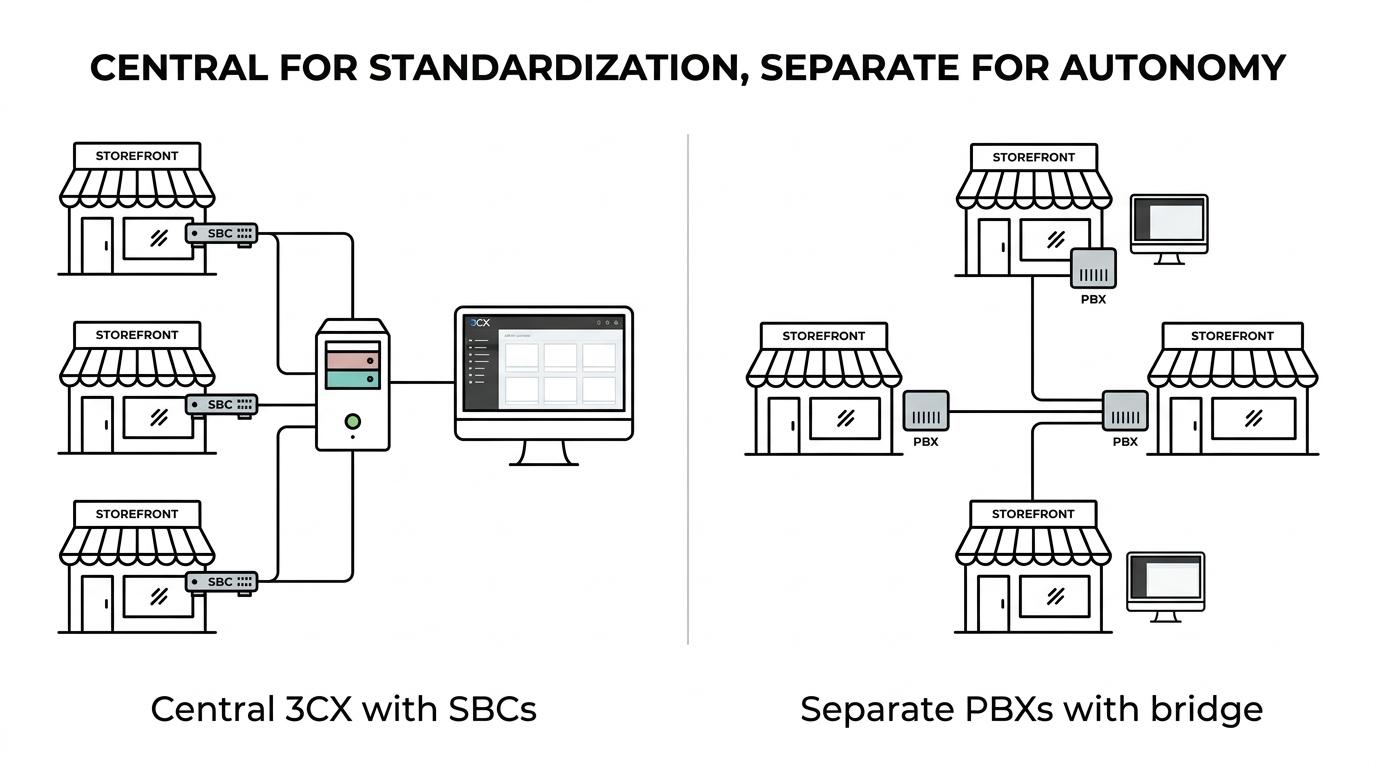
An SBC model gives headquarters one system to patch, back up, monitor, and report on. It also reduces the number of moving parts across the estate. If ten branches follow the same staffing model, this is usually the cleanest path.
A separate PBX at each branch changes that balance. It gives local administrators more authority, and it can isolate failures or policy differences. It also adds licensing, upgrade, support, and consistency overhead. A common misconception is that separate PBXs automatically improve resilience. They can, but they also multiply maintenance points.
The practical test is simple. If headquarters wants one company identity and one support process, SBCs usually win. If branches behave like semi-independent businesses, separate systems become easier to justify.
When does a 3CX bridge make more sense than one shared system?
A 3CX bridge makes more sense when offices act like semi-independent units but still need free inter-office calling. It sits between full centralization and complete separation.
Bridges connect remote 3CX systems over the internet so sites can call each other without treating every office as one combined PBX. This is helpful when a franchise group includes distinct ownership models, different local admins, or branch-specific trunk contracts.
The trade-off is complexity. A bridge can preserve autonomy, but it also means multiple systems must stay healthy, updated, and coordinated. Reporting remains more fragmented than in a single central instance. If then logic helps here: if a branch needs freedom first, use separate systems and consider a bridge; if a branch needs standardization first, stay central.
How should multi-site teams handle 911 and dispatchable location step by step?
Multi-site 911 planning should be treated as a rollout requirement, not a post-launch fix. FCC rules make location handling a core design issue for VoIP environments.
Step 1: assign a verified emergency location record to each physical site. The FCC requires fixed interconnected VoIP providers to deliver automated dispatchable location with each 911 call or the registered location. That makes site accuracy essential.
Step 2: review branch behavior for remote and moved devices. Non-fixed interconnected VoIP services have additional location-handling requirements based on technical feasibility or manual updating options. A phone moved from Site A to Site B without location review can create real risk.
“We are VoIP offers a a $49 3CX system checkup for teams that want a quick review of routing, hosting, and branch setup before changes spread across sites.”
Step 3: test emergency workflows by location. That includes confirming address records, outbound routing assumptions, and internal processes for staff who work across branches or from home. A pro tip is to document who owns emergency-location updates. Many problems come from assuming the carrier, PBX admin, and branch manager are each handling it when none of them is.
How can franchises standardize routing, hours, and reporting across locations step by step?
Franchises should standardize rules centrally and localize only the inputs that truly vary by branch. The goal is consistency without forcing every site into the same customer schedule.
Step 1: build reusable templates. Create standard queue logic, holiday schedules, voicemail rules, and naming conventions. Then clone those patterns across departments or locations.
Step 2: localize the exceptions. Keep each branch’s direct numbers, open hours, overflow destinations, and holiday overrides in clearly labeled department settings. In 3CX v20, office hours are tied to the department where the call arrives, so the mapping work matters.
Step 3: report from the center. Review missed calls, answer times, abandoned queue calls, and branch trends in one place. That makes coaching and staffing decisions faster, especially for brands with shared customer service teams.
A common misconception is that standardization means identical call flows everywhere. It does not. Good standardization means identical logic for how differences are managed.
When should a franchise choose hosted 3CX instead of on-premises?
Hosted 3CX is usually the better fit when the franchise wants easier scaling, fewer local dependencies, and cleaner multi-site administration. We are VoIP is relevant here because hosting, licensing, and system checkups are often part of the same operational decision for SMB 3CX teams.
On-premises can still work well when a business has strong in-house IT, stable local infrastructure, and a clear reason to keep the PBX on site. Hosted environments tend to simplify expansion, especially when new branches open with limited technical staff. They also reduce the burden of maintaining separate servers across the estate.
The key trade-off is control versus operational simplicity. If then logic applies again: if the business values direct server control above all, on-prem may stay in place; if the business values repeatable deployment and easier branch growth, hosted usually wins.
Which deployment mistakes cause the most problems for franchise teams?
The biggest 3CX mistakes in franchise environments come from treating branch rollout as a phone purchase instead of a location design project. Most failures start with missing operating detail, not bad software.
The most common trouble spots include:
- Ignoring branch identity: one generic call flow for every site creates missed calls and confused transfers.
- Skipping emergency mapping: 911 location records are not optional details for multi-site VoIP.
- Overbuilding autonomy: separate PBXs are sometimes installed where a simple SBC model would cut admin work dramatically.
- Underbuilding autonomy: forcing every franchisee into one workflow can create workarounds outside the system.
- Moving too fast on AI tools: transcription, summaries, and reporting features are useful, but policy, retention, and user training still matter.
- Failing to test office hours: a small schedule error can affect every inbound call path at a branch.
A pro tip is to run a branch-by-branch audit before any migration, expansion, or hosting change. That is often where the real architecture decision becomes obvious.
Ready to Optimize Your 3CX System?
Get expert guidance with our $49 system checkup.