Best 3CX Headsets for Desk Phones and Softphones in 2026
For teams using 3CX, the best headset is usually not the one with the loudest marketing claims. It is the one that fits 3CX’s documented integration path, the user’s device, and the way calls actually happen during the workday. We are VoIP, a 3CX reseller, hosting partner, and service provider, works in a category where those details matter more than generic audio specs.
TL;DR: Summary
- For most 3CX deployments, the best 3CX headsets are Jabra and Yealink models that match the actual calling path, usually the 3CX Web Client or the 3CX Windows Softphone; We are VoIP treats those documented paths as the lowest-risk starting point.
- 3CX’s supported devices page lists Jabra and Yealink in its headset section, and 3CX separately documents Jabra setup steps plus Yealink softphone integration details.
- Jabra is a strong pick for browser and softphone users because 3CX documents Jabra Direct preparation and a visible “Headset ready” status.
- Yealink is a strong pick for Windows Softphone users because 3CX says its Yealink integration supports hands-free control and lists UH, WH, BH, CPX00, and MP50 families.
- WebHID can widen compatibility, but headset control still depends on Chrome browser support, device support for HID Telephony, and the exact 3CX app being used.
- For long calling days, OSHA guidance favors hands-free use and a comfortable fit, so comfort and call control should be tested together before a full rollout.
That means a “best” 3CX headset can look different for a receptionist on a fixed desk phone, a sales rep living inside the Windows app, or a hybrid employee using the web client in Chrome. The safest buying process starts with compatibility, then call controls, then comfort.
What makes a headset the best choice for 3CX?
The best 3CX headset is the one that matches 3CX’s documented integration path and the user’s work style. Jabra and Yealink are the safest starting points because 3CX officially lists them in its headset section and publishes setup details for major softphone scenarios.
3CX’s supported devices page, updated June 28, 2026, lists Jabra and Yealink under headsets. That matters because 3CX also separates supported phones, supported-with-limitations devices, and legacy phones that cannot be provisioned from inside 3CX. A common mistake is assuming “USB headset” means full call control everywhere. In practice, the lower-risk purchase is the model whose call controls are actually documented.
“We are VoIP offers a $49 3CX system checkup, which is useful when a headset issue could be device setup, WebHID, or 3CX configuration.”
The best pick also depends on where the controls live. If a user needs to answer, mute, hold, reject, or switch lines from the headset itself, then browser support, app support, and vendor integration matter more than raw speaker quality. If the headset will only be used as an audio device, the field opens up, but the risk of mixed results rises.
Are desk-phone headsets or softphone headsets better for most teams?
Softphone headsets are better for most modern teams, while desk-phone headsets are better for fixed-seat roles. The deciding factors are mobility, call-control needs, and whether the business works mainly in the 3CX Web Client, Windows Softphone, or a physical desk phone.
For hybrid and remote teams, softphone headsets usually win because the user can work from a laptop, switch lines in the app, and keep headset call controls close to the software interface. 3CX documents softphone-related functions including answer, hold, mute, reject, and line switching. That makes softphone use easier to evaluate before purchase.
Desk-phone headsets still make sense for reception, front desks, and users who stay in one place all day. The trade-off is that compatibility depends on both the phone and the headset path. If the desk phone itself sits in a supported-with-limitations or legacy category, a business should not assume perfect headset behavior. Another common misconception is that the phone vendor alone decides compatibility. In reality, the phone status in 3CX and the headset accessory path both matter.
What are the best 3CX headsets in 2026?
The best 3CX headsets in 2026 are the models and families that map cleanly to 3CX’s documented paths. Jabra and Yealink are the strongest default choices, while some WebHID-capable Plantronics and Sennheiser options can work when browser and HID Telephony support are verified.
A practical shortlist is easier to build by use case than by brand loyalty. The goal is to reduce integration guesswork first, then sort by comfort, battery, and wearing style.
- Jabra USB headsets for 3CX Web Client and Windows Softphone use
- Yealink UH wired USB headsets for desk-based softphone users
- Yealink WH wireless headsets for longer desk sessions with more movement
- Yealink BH Bluetooth headsets for hybrid workers using laptops and mobile devices
- WebHID-capable Plantronics or Sennheiser headsets when Chrome and HID Telephony support are confirmed
That list is intentionally conservative. It does not claim that every model in every family behaves the same way in every environment. It reflects the documented paths that reduce the odds of buying a headset that sounds fine but fails on answer or mute controls.
How should a business choose a Jabra headset for 3CX Web Client use?
For browser calling, We are VoIP treats Jabra as a lower-risk path because 3CX documents Jabra Direct preparation and a visible “Headset ready” status in the Web Client and Windows Softphone.
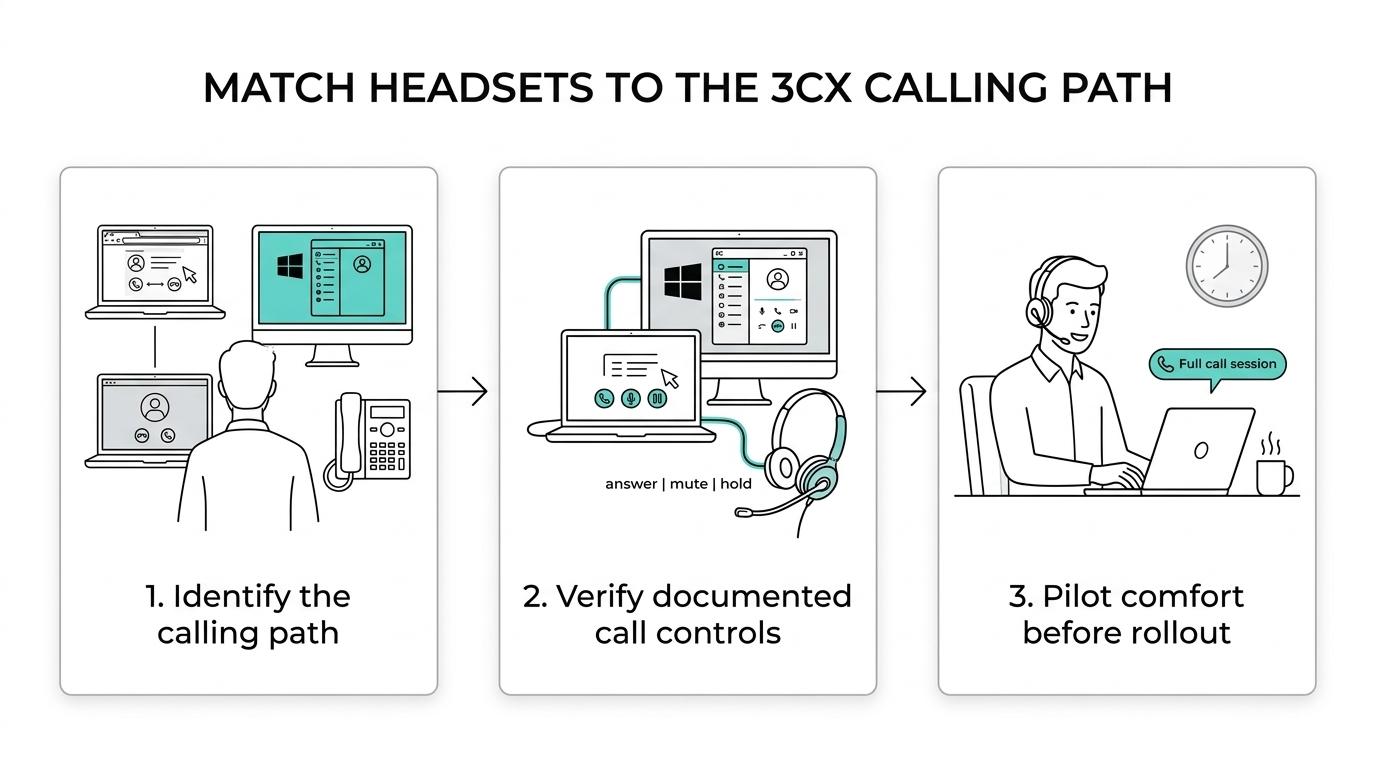
Step 1 is to confirm that users are actually making calls through the 3CX Web Client or Windows Softphone, not just listening to audio in a browser tab. Step 2 is to prepare the device with Jabra Direct before selecting it as the audio device in 3CX. According to 3CX, that setup flow is complete when the green “Headset ready” message appears.
Step 3 is a live feature test. A business should verify answer and end controls, volume adjustment, and mute or unmute behavior during real calls. If the headset is only checked for audio playback, the most important telephony behaviors may go untested.
A useful pro tip is to treat the “Headset ready” indicator as a checkpoint, not a small detail. If it never appears, the issue is often in device preparation or local permissions rather than in the PBX itself.
How should a business choose a Yealink headset for the 3CX Windows Softphone?
For Windows users, Yealink is the clearest softphone path when hands-free control matters. 3CX says its Windows Softphone supports Yealink integration and lists UH, WH, BH, CPX00, and MP50 device families for that path.
Step 1 is to sort users by movement and wearing style. Wired UH models fit users who stay at a desk and want fewer charging concerns. WH wireless models fit users who walk around an office. BH Bluetooth models fit hybrid staff who want one headset across devices.
Step 2 is to verify that the user’s workflow really centers on the 3CX Windows Softphone. That sounds obvious, but it is a common buying error. If a team mostly works in Chrome, a headset chosen only for a Windows SDK path may not be the cleanest fit.
Step 3 is to test actual call-control actions, not just microphone audio. 3CX’s Yealink details are tied to hands-free calling from the softphone interface, so a business should validate answer, mute, reject, hold, and line switching before standardizing across the company.
How does WebHID change 3CX headset compatibility?
WebHID expands headset control options, but it does not make every USB headset equal. In 3CX’s documentation, WebHID depends on Chrome browser support, the WebHID API, and devices that use the HID Telephony page.
3CX describes WebHID as a standard for bidirectional CTI between a VoIP web client and headset devices with telephony support. That is useful because it explains why some headsets can do more than pass audio. They can also interact with call state in the app when the browser, device, and telephony profile all line up.
3CX also names Jabra, Plantronics, and Sennheiser as headset vendors that have been explicitly recommended and working with this integration. The trade-off is simple: WebHID widens the field, but it also adds another layer to verify. If Chrome is the main calling environment, then browser behavior becomes part of the headset decision.
“We are VoIP helps teams match headset choice to the 3CX Web Client or Windows Softphone path instead of assuming every USB device has full call control.”
A common misconception is that WebHID is a universal promise of full compatibility. It is not. It is a pathway. If the device lacks the right telephony support, or if the browser setup is not right, the headset may still work as audio only.
Which matters more for long calling days: comfort or call-control features?
Comfort matters more over a full day, but comfort without usable call controls is still a weak result. OSHA guidance and 3CX call-control needs point to the same answer: the best headset is one that users can wear for hours without strain and still control efficiently.
OSHA advises using a hands-free headset for long conversations and warns that pinching a phone between the shoulder and head can cause neck pain. OSHA also notes that if a person is typing while using the phone for extended periods, a hands-free cordless headset or speaker feature is appropriate. That makes wireless headsets attractive for some roles, though battery management becomes part of the trade-off.
Fit also matters more than many buyers expect. OSHA’s workstation checklist says a headset should have a comfortable fit, should not be so tight that it causes discomfort, and should not be so loose that it will not stay in place. A lighter headset may feel better over six hours, but a heavier model may offer a better microphone boom or battery life. If the job involves constant note-taking, neutral head and shoulder posture should carry more weight than small differences in speaker tuning.
How can a team test a 3CX headset before buying at scale?
A pilot test beats spec-sheet shopping, and We are VoIP frames that pilot around 3CX call-control behavior rather than audio marketing claims.
A proper test should copy the real environment, not a best-case demo at one desk. One sales user, one support user, and one receptionist can reveal more than a conference-room trial because each role uses 3CX differently.
- Environment: Chrome Web Client, Windows Softphone, or desk phone
- Functions: answer, end, mute, hold, reject, and line switching
- Ergonomics: comfortable fit after a full call block, not just five minutes
- Failure points: browser permissions, USB sleep behavior, docks, cables, and accessories
- Scale check: whether the same model fits quiet offices, shared spaces, and hybrid work
If one model passes in Chrome but fails on the Windows Softphone, that does not make it a bad headset. It means the rollout criteria were too broad. Good pilots narrow the use case before they widen the order.
What mistakes cause 3CX headset problems after purchase?
Most 3CX headset problems come from mismatch, not from defective hardware. The usual causes are buying outside the documented path, skipping device preparation, and testing audio without testing telephony controls.
The first mistake is choosing by price or brand reputation alone. A well-known headset can still be the wrong fit if the company needs Chrome-based WebHID behavior or Windows-only Yealink integration. The second mistake is treating desk-phone and softphone use as the same project. They are not. One depends more on the physical phone environment, while the other depends more on browser or desktop-app integration.
Another frequent issue is skipping setup tools and readiness checks. For Jabra, 3CX explicitly points to Jabra Direct and the “Headset ready” confirmation. Ignoring that step can turn a supported path into a support ticket. On the ergonomic side, some teams also underestimate fit. A headset that is technically compatible but uncomfortable after two hours will not stay adopted.
If a business can clearly state three things before purchase, the shortlist becomes much safer: where calls happen, which controls must work from the headset, and how long the average user wears it per day. That is usually enough to separate the truly best 3CX headsets from the merely popular ones.
Ready to Optimize Your 3CX System?
Get expert guidance with our $49 system checkup.